Veterinary healthcare · 130-clinic network · 0-to-1 Builder
Atlas Veterinary Network
Transformed 130 disconnected clinic websites into a unified digital ecosystem — standardized architecture, relational CMS, and a 0-to-1 no-code builder.
↑ 41%
Organic search traffic increase within 6 months.
↑ 16%
Booking conversion rate improvement.
↑ 74%
Pages successfully indexed by Google.
100+
Clinics launched under the new architecture.
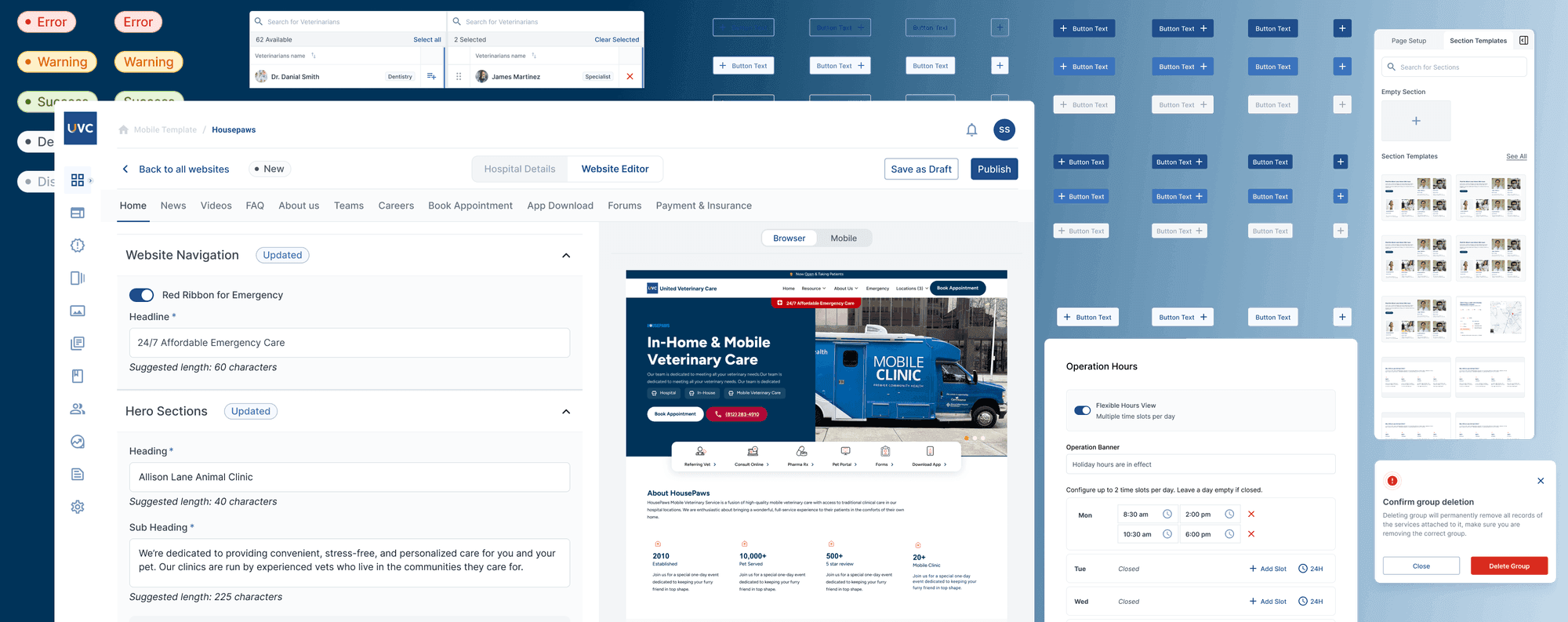
The short version
- The problem
- 130 clinic websites with no shared architecture — duplicate content across sister clinics, pet owners in crisis unable to find hours or a phone number, and every content change gated behind an IT ticket.
- The call
- Not one template, and not 130 bespoke ones. Map every clinic to one of 5 clinical archetypes, plus a sixth for the parent brand — so a newly acquired clinic onboards in days instead of months.
- What I owned
- Design across all three phases — standardisation, the relational CMS, and the 0-to-1 no-code builder. Sole designer on an 8-person team with 2 PMs.
- The outcome
- Organic traffic up 41%, booking conversion up 16%, indexed pages up 74%, and 100+ clinics launched on the new architecture.
- Company
- Shyftlabs
- My role
- Product Designer
- Platform
- Web, CMS, SaaS Builder
- Duration
- 3 Phases, Two Stints
Tools · Jira · Figma · Google Analytics · Hotjar · WordPress Audit · React · Tailwind CSS
How I Owned the Design
130 clinics. 3 phases. Sole designer on an 8-person team.
Atlas needed someone who could understand the data architecture, design the user experience, and coordinate engineering delivery — simultaneously. I owned the design across all three phases: standardization, CMS architecture, and the 0-to-1 site builder. The build team was 8 people with 2 PMs, working in 2-week sprints — I was the only designer on it, which is why the architecture decisions and the interface decisions had to be the same decisions.
Timeline note: I led the first stage here for roughly six months, moved to Carter while supporting this part-time, then returned full-time as the later phases ramped up.
Specs & Phased Rollout
Wrote design specs for each phase. Defined scope, acceptance criteria, and rollout strategy for every location in the network.
Data Architecture
Designed the relational taxonomy — services, specialists, locations as connected nodes, not static pages.
0-to-1 Product
Scoped, spec'd, and shipped the no-code site builder from scratch. Zero engineering tickets for custom pages.
“We're acquiring clinics faster than we can bring them into the network properly. Our digital infrastructure is a bottleneck to growth.”— Atlas Leadership
The Strategic Bet
130 clinics wanted custom. I standardized to 6 templates.
Why six templates and not one, or a hundred
The instinct was to move fast — pick one template, deploy everywhere. I pushed back. A General Practice clinic in rural Montana and a Specialty oncology center in Chicago serve fundamentally different users under different emotional states.
But a bespoke design per clinic was equally unsustainable. The product call: map every clinic to one of 5 clinical archetypes — GP, Specialty, ER, Hybrid, Multi-Location — plus a sixth template for the parent brand site that sits above the network and does a different job: introduce the group, not convert a local visit. Any newly acquired clinic onboarded in days, not months. No custom design work, no IT bottleneck.
Discovery
Weeks of auditing — categorizing clinic types, mapping user journeys, running heuristic evaluations on worst-performing sites. Key insight: the most engaged ER users were elderly pet owners. A 70-year-old whose dog collapsed at 2am can't parse cluttered navigation. That grounded every decision in WCAG 2.1 AA as a non-negotiable baseline — high-contrast palettes, generous typography, time-critical info above the fold on every template.
Zero
SEO Governance
Duplicate content across sister clinics. Missing schema markup. Google penalizing Atlas for same doctor bios on 40+ pages.
Critical
Emergency Abandonment
Pet owners in crisis couldn't find hours, address, or phone. Low-contrast text, no mobile optimization. UI as an obstacle.
Days
IT as Gatekeeper
Updating clinic hours or adding staff required an IT ticket and days of wait. Local teams had zero autonomy.
Relational Taxonomy
Building the taxonomy that connects
services, specialists, and locations.
Static pages were dead. The moment a doctor joined or left a clinic, or a service was added or discontinued, a static page became wrong. And across a network that size, wrong pages at scale meant hundreds of broken user journeys and Google penalties.
We redesigned the data model from the ground up — turning every service, specialist, and location into a relational node rather than a static page. The taxonomy we built had four levels: Service Category → Service Type → Detailed Offering → Metadata Attributes. This meant a search for “Oncology” could automatically surface the right specialists, their certifications, and the specific clinics equipped to handle chemotherapy — without any manual linking per clinic.
General Practice
Speciality
Emergency
Additional Services
Multi-Location
Wellness & Preventive Care
Has Ext. DetailsDiagnostics & Lab Testing
Dental Health checkup
Vaccinations
Parasite Prevention
Nutritional Advice
Product Decision — Template Architecture
Not one template. Five clinical realities.
After mapping every clinic type, we landed on 6 templates covering the entire Atlas universe — five clinical archetypes, plus one for the parent brand site. Any newly acquired clinic maps to an archetype within the first week. The templates weren't rigid — they were a shared structural skeleton with intentional flex points at the local level.
The Architecture
The 6 Templates
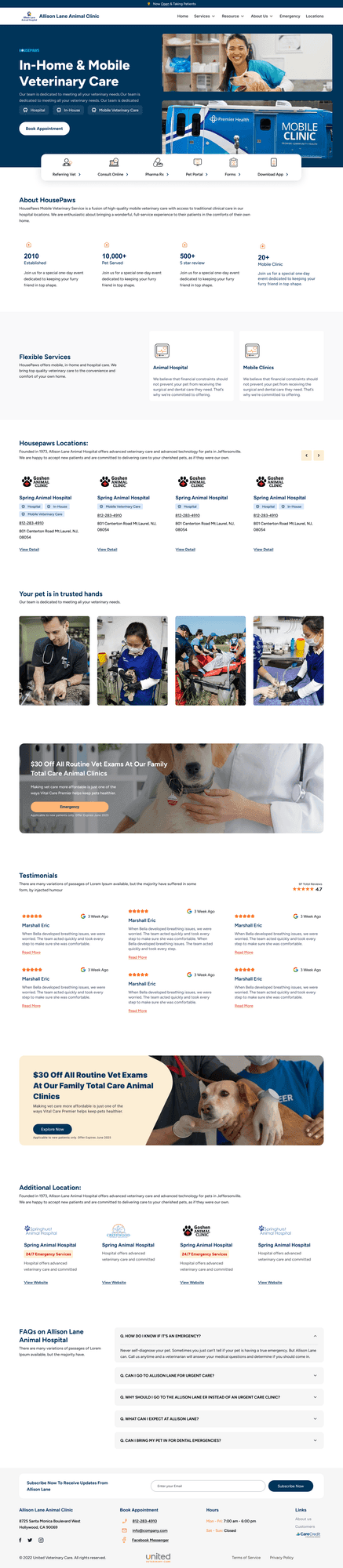
Five clinic archetypes — shown here, every clinic maps to one of them — plus a sixth for the parent brand site, which introduces the group rather than converting a local visit.
Multi-Location Template
Mobile + Spec + ERFully responsive mobile-first design optimized for on-the-go pet owners. Prioritizes click-to-call, directions, and fast-loading content.
Specialty Clinic
SpecialtyDesigned to highlight advanced medical capabilities, doctor credentials, and referral forms for other veterinarians.
Emergency Clinic (ER)
ERHigh-contrast, action-oriented design. Prioritizes 'Call Now' and 'Get Directions' functionalities for high-stress triage situations.
Specialty + Emergency Hybrid
Spec + ERA complex dual-funnel architecture that seamlessly routes urgent cases to the ER while allowing specialty clients to research chronic care.
General Practice (GP)
GPStandardized layout optimized for wellness, preventive care, and routine checkups. Focuses on easy booking flows and localized SEO.
Phase 1 — Business Outcomes
Standardization wasn't glamorous. But better structure meant better crawlability, better UX, and a data model that could scale.
↑ 41%
Organic search traffic increase within 6 months.
↑ 16%
Booking conversion rate improvement.
↑ 74%
Pages successfully indexed by Google.
100+
Clinics launched under the new architecture.
Figures are internal metrics measured post-launch over the phase window.
The Strategic Bet
Build vs. Buy. Every off-the-shelf CMS failed the test.
Why a relational CMS, not a page-based one
Templates were live. But keeping them accurate across the whole network was impossible. A specialist practicing across three locations — under the old system, their bio existed as three separate copy-paste entries. One email change meant three manual updates. Multiplied across hundreds of specialists, this was an SEO crisis — Google detected near-duplicate content at scale and penalized the entire domain.
WordPress, Contentful, Webflow — none handled the relational complexity of a multi-tenant veterinary network. The product call: build a proprietary headless CMS engineered for Atlas's operational model.
What I Said No To
Stakeholders wanted per-clinic custom workflows (unsustainable at that scale), real-time chat integration (6-month build, unclear adoption), and patient portal login (compliance risk, out of scope for Phase 2). Each cut went into the PRD's parking lot with the specific signal that would reopen it.
Singular Sources of Truth
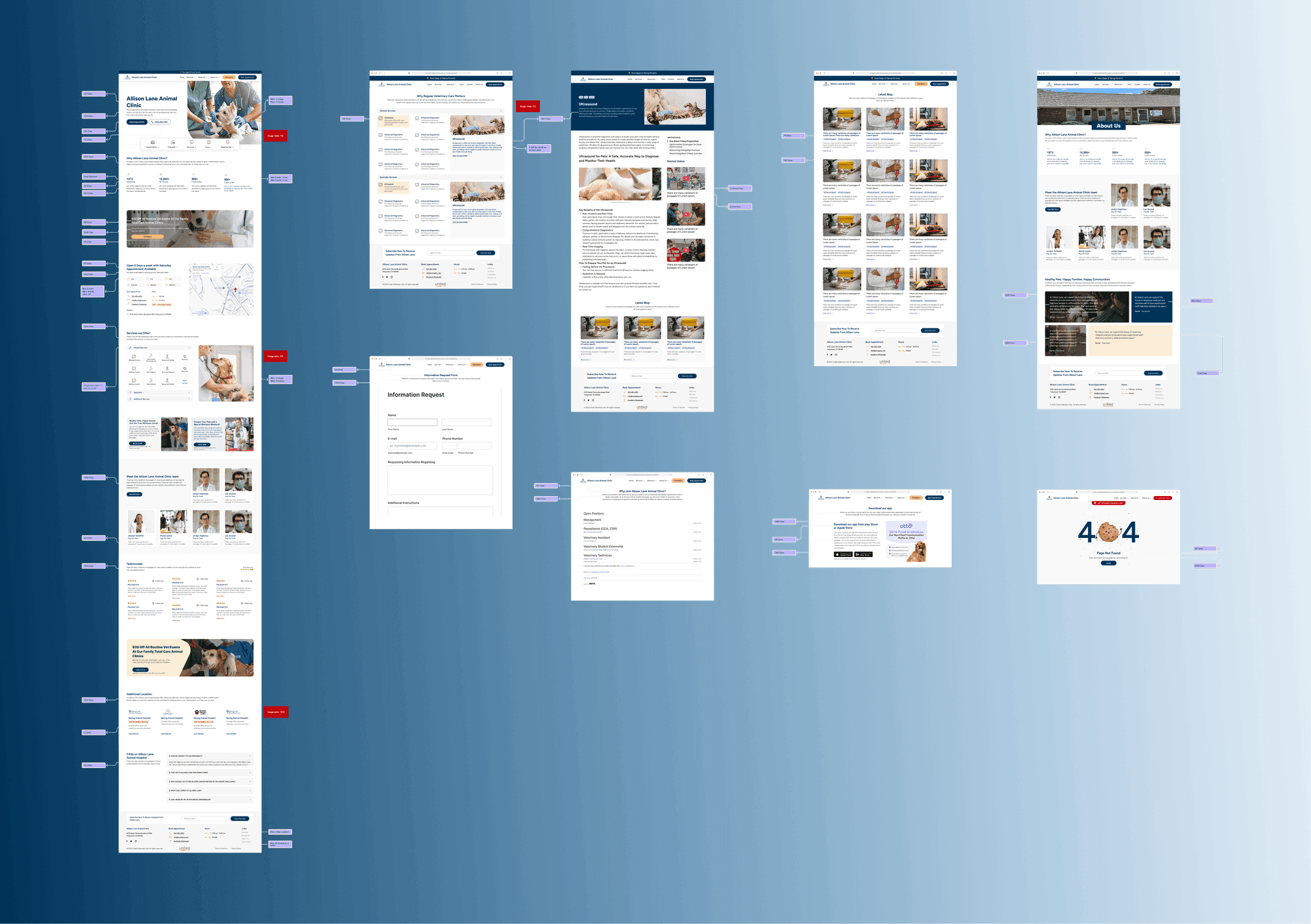
Every specialist, service, and location as a single data record. Update centrally, cascade instantly to every linked clinic page.
Relational Content Linking
CMS mapped relationships — specialists to certifications, services to locations. Google's schema finally understood Atlas as an interconnected ecosystem.
Block-Level Architecture
Modular block system instead of rigid page forms. Clinics assemble pages from pre-approved blocks — doctor spotlights, service cards — without code.
Parent-Child Hierarchy
Multi-location groups get parent-child pages. Parent presents unified narrative; child locations inherit brand elements automatically.
Product Decision — Branding System
Clinic-level theme customization. Identity without chaos.
Newly acquired clinics wanted to keep their legacy identity. The product call: let clinics adjust primary/secondary color palettes within the CMS. The design system auto-mapped choices to WCAG-compliant shades — branding freedom without breaking accessibility.
Phase 2 — Business Outcomes
The relational CMS collapsed an operational nightmare into a manageable workflow and gave Google the structured data it needed.
45%
Reduction in user navigational friction via session analysis.
Zero
Duplicate content penalties after canonicalization.
Hours
Time to integrate a newly acquired clinic.
Figures are internal metrics measured post-launch over the phase window.
The Strategic Bet
Templates handled 90%. The 10% was killing engineering.
Why a no-code builder was the right third phase
Phase 2 gave clinic teams content independence. But as Atlas grew, so did requests outside the framework — community vaccination drives, new specialist landing pages, holiday hours. Every request landed in the engineering sprint queue. Turnaround was days, sometimes weeks.
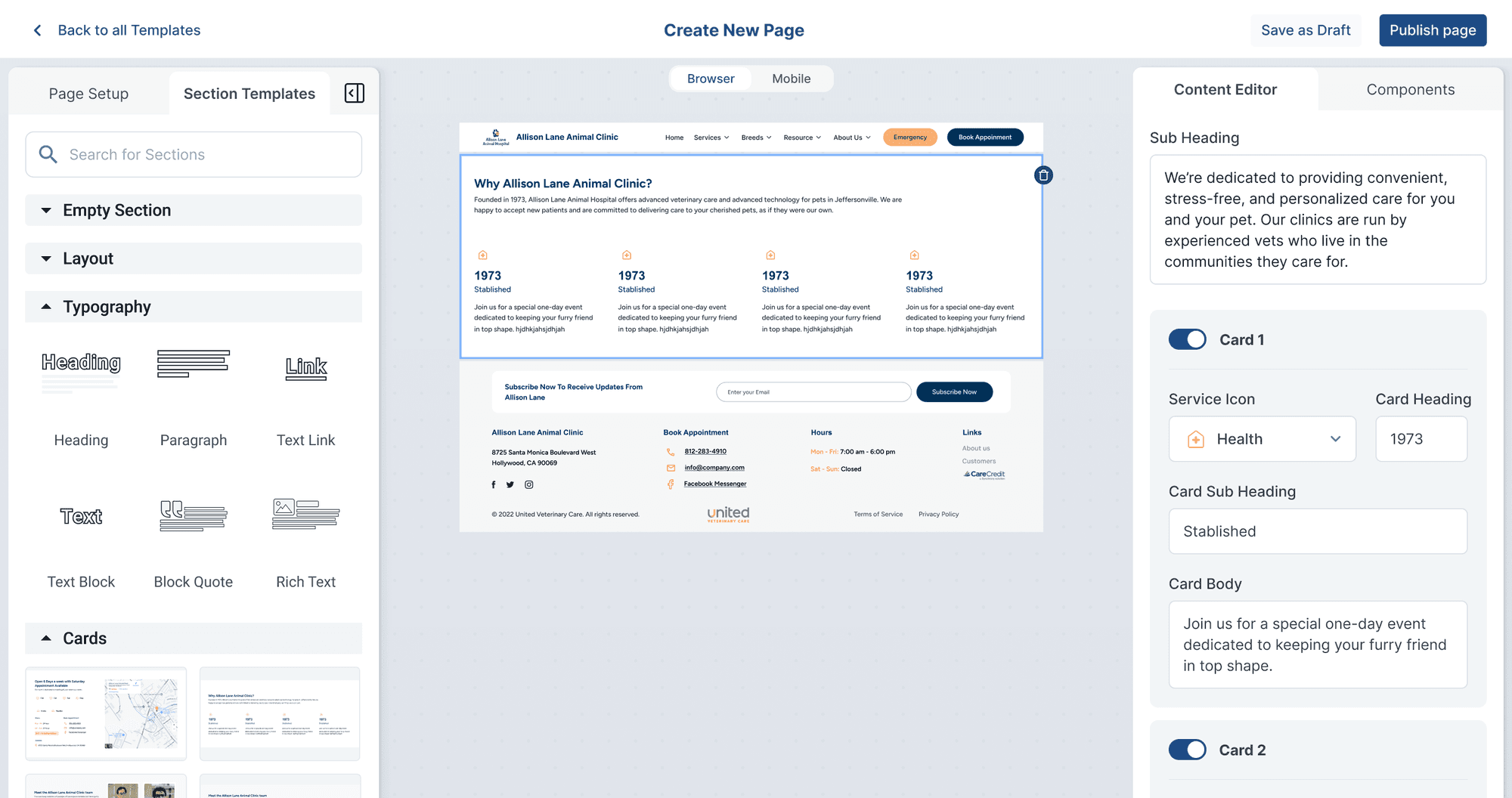
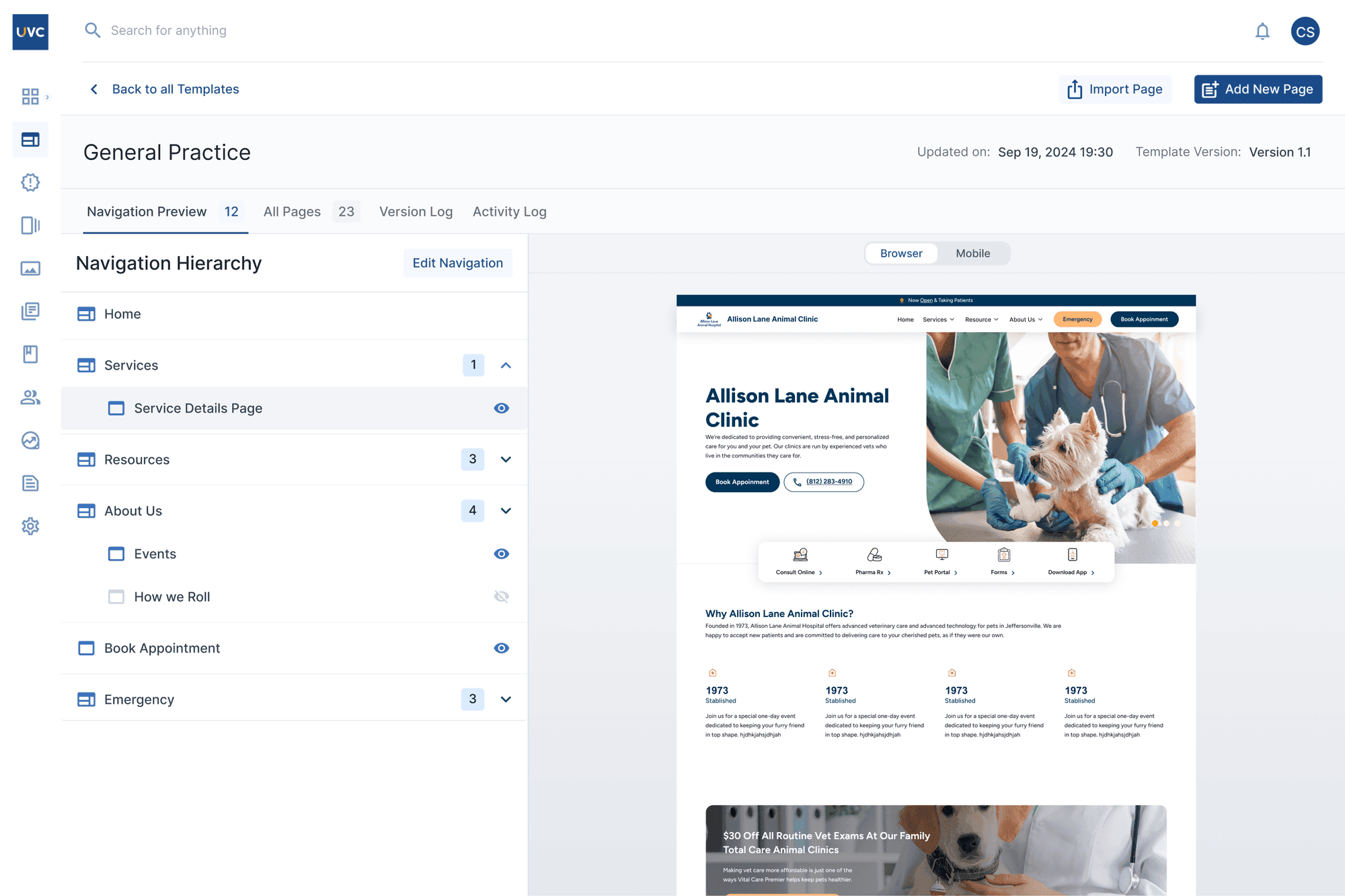
The product call: build a 0-to-1 drag-and-drop site builder natively integrated with the CMS. Regional managers could build and publish custom pages — zero IT approval required. The design system enforced brand and accessibility rules invisibly.
Invisible Constraints
Every block pre-governed by the design system. Managers choose layout and content — not colors, not typography. Creative freedom with zero brand violations.
Relational Components
Drop in a “Doctor Card” — photo, bio, credentials auto-populate from the central record. Same relational layer powering the ecosystem.
What didn't work first
First version of the builder gave managers full section reordering. Result: pages with CTAs buried below the fold and hero sections mid-page. Iterated: switched to fixed structural zones with flexible content blocks inside them. Layout integrity preserved, creative freedom maintained.
Phase 3 — Business Outcomes
The site builder changed the power dynamic between central IT and local clinic teams. Marketing finally moved at the speed of marketing.
~0
Engineering tickets for routine custom pages, once teams self-served.
Hours
Time to launch a custom marketing campaign.
Zero
Brand or accessibility breakages across 50+ pages.
Figures are internal metrics measured post-launch over the phase window.
The Real Story
The layout was never the decision. The data model was.
The most impactful decision wasn't a layout — it was the data architecture. Making every specialist, service and location a relational node instead of a static page is what made the CMS possible and what gave the site builder its power.
The real test came afterwards. The same template model and content architecture were reused for a larger network — without redesigning the system. A structure that only fits the network it was drawn for isn't architecture; it's a template. This one held.
Three phases. I wrote the design specs, defined the phased rollout, worked with engineering through delivery, and shipped the design across all of them — which is what made 130 clinics feel like one ecosystem, and made the next network possible.